
Please check the following on your Android device:
1. Check that the app is allowed to run in the background
If you open up the Salestrail app, and you see a notification about Battery Optimization then the app cannot function properly and log your calls in real time.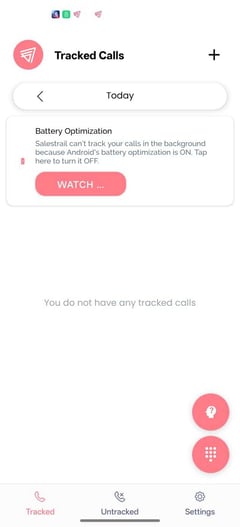
Turn off "Battery Optimization" or "Battery Saver" for Salestrail by clicking the notification.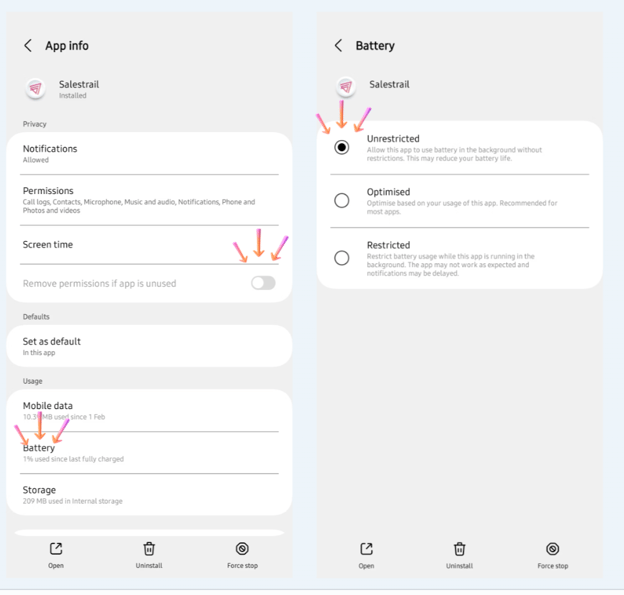
Salestrail needs to be set as "not restricted", "unrestricted", "do not optimize" or as "allow app to run in the background".
Some devices offer the option to designate an app as a 'never sleeping app,' allowing it to run continuously in the background without interruption. Use this setting if it is available on your device. See the required settings for your device here.
2. App Paused Due to Android Background Limits
Even though you have given the app permissions to stay on in the background, Android might anyway close you app to save battery. Android 14 and newer versions limit how long apps can run in the background. Most apps, including Salestrail, are allowed to stay active for only about six to eight hours before Android pauses them. This change is intended to save battery and improve performance, but it also means Salestrail cannot stay active indefinitely.
When Salestrail is paused by Android, call logging will stop until the app is reopened.
What do I need to do?
To keep call logging active open the app every now and then. Salestrail will also tell you if your app has been paused by sending you a notification:
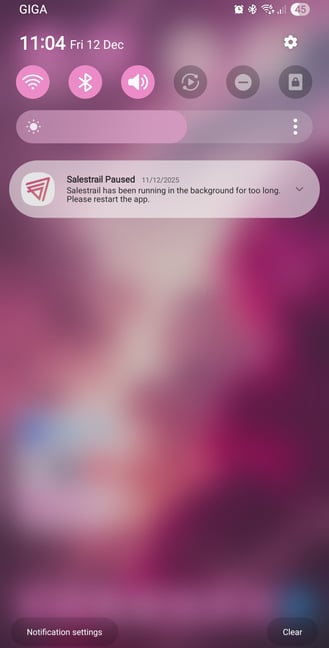
Tap the notification or open the app manually. This restarts the background timer for another six to eight hours.
3. Autostart / Auto Launch Permission
This allows Salestrail to start in the background even when the device is idle or the app is not actively being used. Note: Some devices do not have this setting. For example Samsung. For more information and specifics for your device, visit Devices.
Select your device below to view the step-by-step instructions for setting up these settings.