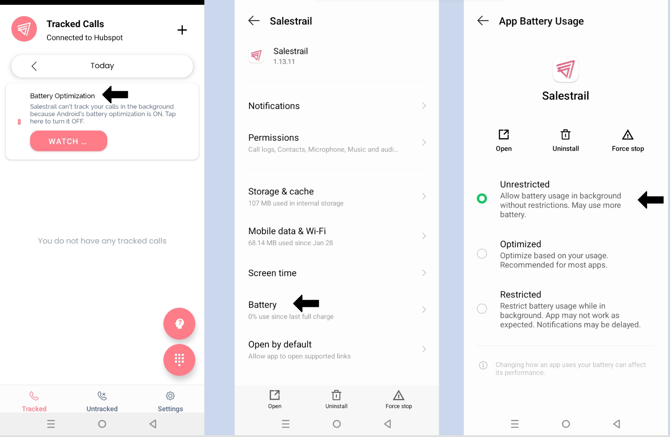
To ensure Salestrail works properly, follow these steps to disable battery optimization and enable auto start.
Note: Settings may vary depending on the Infinix device model.
Disabling Battery Optimization
Option 1: Via Salestrail app
Click on the notification on your Salestrail app>Tap on Battery> Select Unrestricted
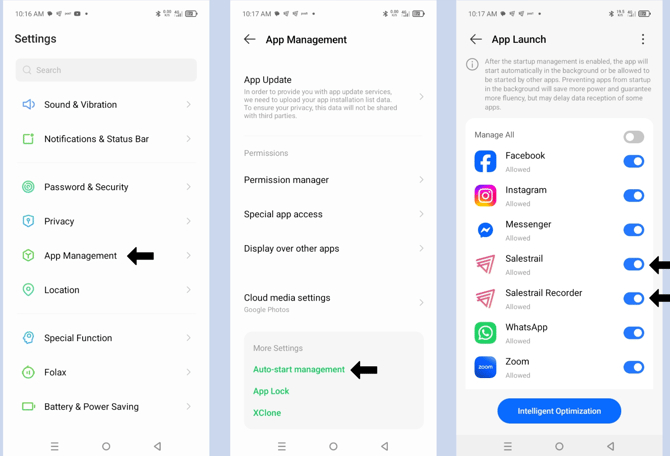
How to Enable Auto Start (Background App Launch) on Infinix Devices
This ensures that Salestrail restarts automatically.
Enable Auto Start
-
Go to Settings > Apps Management
-
Scroll down to More Settings>Click on Auto-start Management and it opens App launch
-
Turn on for Salestrail. and Salestrail recorder(if you are using Salestrail Recorder APK)