
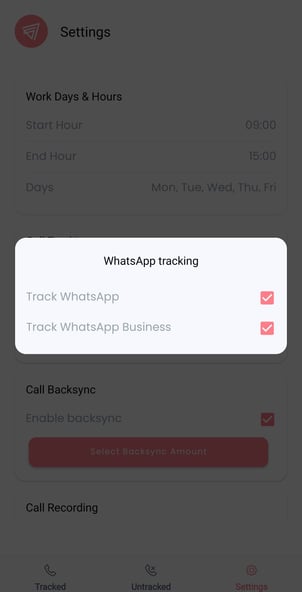
Check 1: Is WhatsApp call tracking enabled?
Recording requires tracking to be enabled first. Open the Salestrail app and go to Settings > Call Tracking and make sure Track WhatsApp Calls is on and the correct WhatsApp source is selected.
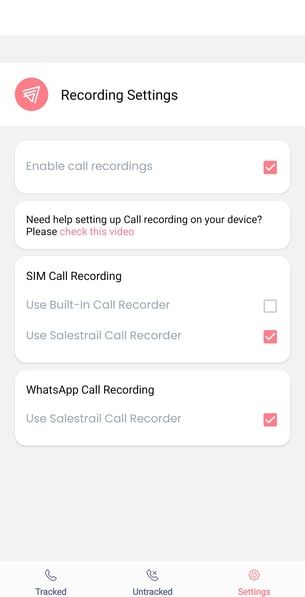
Check 2: Is WhatsApp recording selected?
In Settings > Recording Settings > WhatsApp Call Recording, make sure Use Salestrail Recorder is selected. The built-in recorder does not support WhatsApp recording — the APK is always required for WhatsApp.
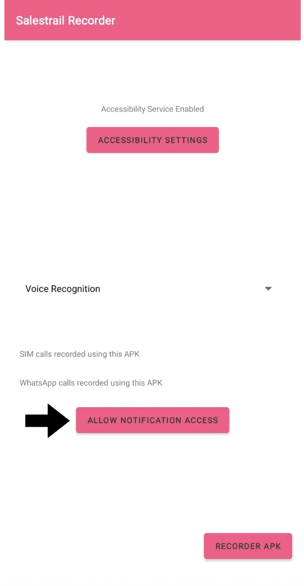
Check 3: Is notification access granted to the Recorder APK?
WhatsApp recording relies on notification access to detect when a WhatsApp call starts. Open the Salestrail Recorder APK and tap Allow Notification Access for WhatsApp Call Recording. In the notification access list, find Salestrail Recorder and toggle it on.
Check 4: Are WhatsApp notifications turned on?
Go to Phone Settings > Notifications > WhatsApp and make sure notifications are enabled. If WhatsApp notifications are blocked, Salestrail cannot detect incoming WhatsApp calls.
Check 5: Is the Recorder APK battery optimized?
Repeat the battery optimization check for the Recorder APK. WhatsApp recording is particularly sensitive to the APK being closed between calls.