
First: is WhatsApp tracking supported on your device?
WhatsApp call tracking is only available on Android. If you are on iPhone, this is not supported — it is an Apple platform restriction with no workaround. See Known Limitations.
If you are on Android, continue with the checks below.
Check 1: Is WhatsApp call tracking enabled?
Open the Salestrail app and go to Settings > Call Tracking. Look for the Track WhatsApp Calls toggle and make sure it is turned on. If this is off, no WhatsApp calls will be tracked regardless of any other settings.
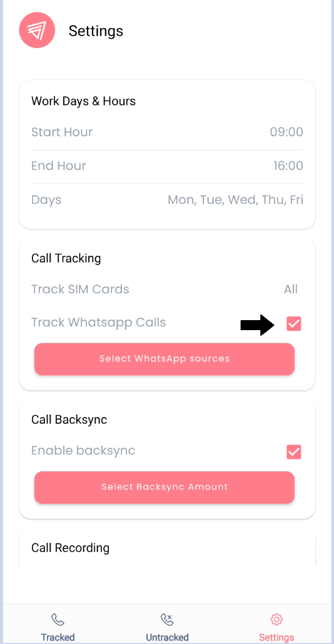
Check 2: Is the correct WhatsApp source selected?
In the same settings screen, tap Select WhatsApp Source. You will see options for WhatsApp, WhatsApp Business, or both. Make sure the correct one is selected for the app you are using to make calls.
If you use both WhatsApp and WhatsApp Business, select both.
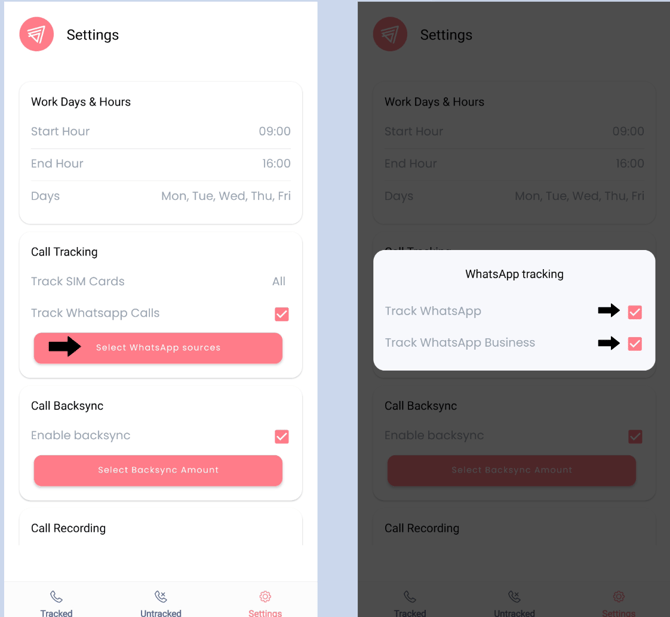
Check 3: Is notification access granted to Salestrail?
Salestrail uses WhatsApp notifications to detect when a WhatsApp call starts. Without notification access, it cannot see that a call is happening.
To check and enable it:
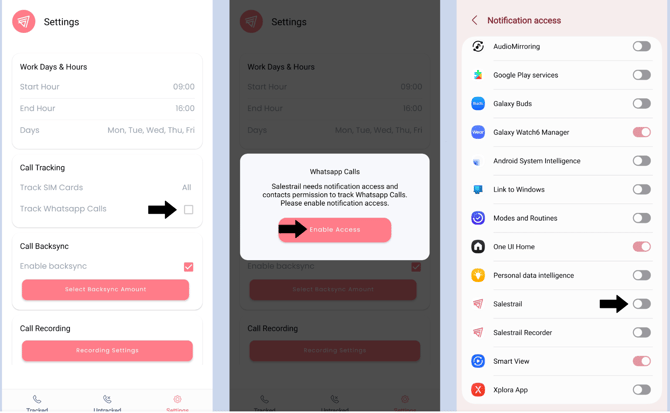
- Go to Phone Settings > Apps > Special App Access > Notification Access
- Find Salestrail in the list
- Make sure it is toggled on
- Alternatively, when you enable WhatsApp tracking in the Salestrail app, it will prompt you to grant notification access. If you skipped this step during setup, go back and grant it as shown below.
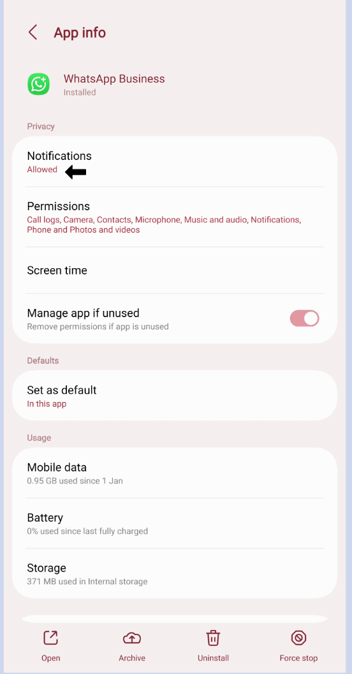
Check 4: Are WhatsApp notifications turned on?
Salestrail can only detect WhatsApp calls through WhatsApp's own notifications. If WhatsApp notifications are turned off on your device, Salestrail has no way of knowing a call is taking place.
Go to Phone Settings > Notifications > WhatsApp and make sure notifications are allowed. Also check within the WhatsApp app itself that notifications are enabled.
Check 5: Is battery optimization disabled for Salestrail?
If Android closes Salestrail in the background before a WhatsApp call starts, the call will not be detected. Go to Phone Settings > Apps > Salestrail > Battery and make sure it is set to Unrestricted. Also turn off Remove Permissions if App is Unused. Click here to see your specific Battery Settings.