
Once you're satisfied with your Salestrail trial experience, don’t wait to secure licenses for your team! We’ve made the purchase process quick and hassle-free to keep things simple and user-friendly.
-
Go to the Call Analytics dashboard.
-
Choose Subscription > Purchase > Select the suitable plan for your team.
-
Select monthly or Annual licences and the number of licences you need. Note: all users will require a licence.
-
Add additional features if necessary.
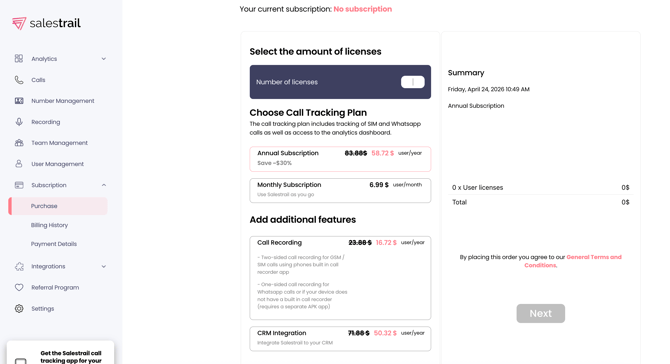
After the purchase has been completed, all users in your Org will see "Your Name has purchased x licenses for your organisation" when they go to the same page.
Note:
-
Please note that only one designated user can manage purchases for your organisation. If this person leaves and you need to assign this responsibility to someone else, please contact us at support@liid.com and we will assist you.
-
Once a subscription has been purchased, payments will be recurring and charged automatically. If a payment fails, or if your card requires 3D authentication, you will receive an email with a payment link to complete the transaction.
-
Please do not attempt to pay a pending invoice through the purchase section, as this will result in the purchase of additional licences rather than settling the outstanding invoice.
-
If you see a pending invoice or a notification on your dashboard about a missed payment, please contact us at support@liid.com so we can guide you.