
If you aren't using Salesforce, Hubspot, LeadSquared, Zoho or Microsoft Dynamics unfortunately, you cannot use our seamless integration. However, you can still push all call data to your CRM.
It's fairly simple to enable and implement our Push API integration if you follow a few steps below:
Step 1: Sign up on the Call Analytics dashboard and create your organisation if you haven't already.
Step 2: Create a webhook or some other listener that can take in data. This step is crucial so it's great if you have an IT team that could help out. Note: Only Owners can do this step.
Step 3: Go to Integrations > Apps > Push API > Connect.
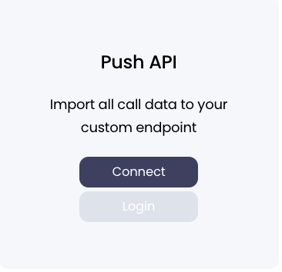
Step 4: You and the team members will receive an email notifying them about this. If you cannot find it in your Inbox, check your Spam folder as well.
Step 5: Go to the Call Analytics dashboard and click either the link on the notification below or go to Integrations > Apps > Push API > Login.
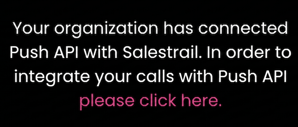
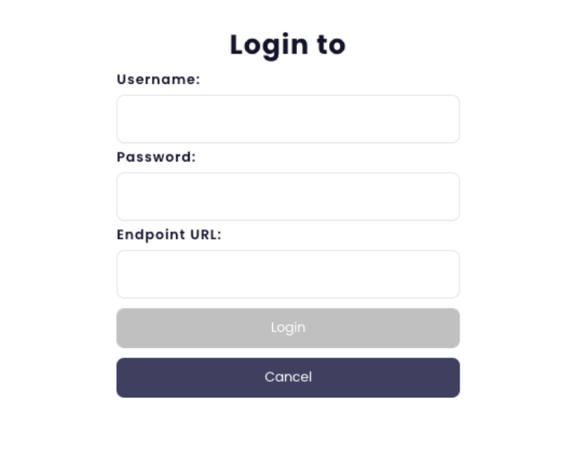
Note: Username & Password are required fields but if your API does not have authentication, you can just fill in something for them.
Note 2: Only the owner is able to set and change the username and password used in the organisations Push API integration.
Fill in your webhook URL to the endpoint URL field.
Step 6: Make calls 😊
Data object that is received from our Push API:
{
  "userId": "11111111-user-id22-3333-444444444444",
  "userName": "Test Man",
  "userEmail": "test.man@mail.com",
  "userPhone": "+49501234567",
  "callId": "12121212-2323-3434-4545-123412341234",
  "source": "android",
  "sourceDetail": "SIM",
  "startTime": "2021-10-08T10:05:37Z",
  "duration": 300,
  "answered": true,
  "inbound": true,
  "number": "+358401234567",
  "formattedNumber": "+358401234567",
  "createdAt": "2021-10-08T10:08:16.316843Z"
}
If you want to push call recording links to your CRM as well, you can either use the dashboard link of the form https://callanalytics.salestrail.io/recordings/{callId} where callId is the UUID parsed from the push request, or use the pull API https://standalone-api.salestrail.io/export/calls/{callId}/recording
Call Id at the end of the URL requires the dashes in the UUID string. For example:
https://callanalytics.salestrail.io/recordings/900d8b36-231a-460f-b475-bc768fe8a64c